Computer Notes, Programming codes, Hardware and Networking Tip, Entertainment, Biography, Internet Tip, Tech News, Latest Technology, YouTube,

Latest Post
About RAM Advantages of multiprocessing system Associative memory Binary Number System CA CA Notes Change drive icon change pendrive icon Computer Abbreviation Computer Architecture Computer fundamental MCQ Computer Generation Computer generation computer notes Computer MCQ Computer Network MCQ Computer Operator MCQ Critical Section Critical section in OS Database connectivity in java Deadlock avoidance Deadlock detection algorithm Deadlock Detection and Recovery Deadlock detection method Deadlock Handling Deadlock in OS Deadlock Prevention Deadlock Recovery define object and class Define system cell Descrete Structure Device Driver Device driver in computer device driver in os DFA DFA contains with DFA ends with dfa examples dijkstra's algorithm Discrete Structure Discrete Structure graph theory Download JDBC Driver Download MySql Download PUBG DS DS Notes FCFS Job Scheduling Algorithm Finding shortest path Finite Sate Automata Flynn's Classifications fragmentation in computer fragmentation in harddisk fragmentation in os fragmented memory Full form related to computer Generations of operations Generations of OS Graph theory ICT 1st semester notes Instruction Address Modes Java java array declaration java class and object example Java Database connectivity example java event handling example program Java JDBC Java JMenuBar Java JSP program example java notes java program methods example Java program to create class and object java program to create methods java program to print even number between any two numbers Java programming java programming notes Java programs Java question answer java swing example java swing program to calculate simple interest Java Tutorials JSP program learn qbasic Lekh MCQ MCQ Computer MCQ Operating System memory fragmentation MICT 1st semester notes mict 1st semester operating system notes MICT first semester notes Multiprocessing mutex in os Necessary conditions for deadlock Number System Operating System Operating system notes OS OS Notes OS Numeric pattern printing program in qbasic patterns in qbasic Pipeline Hazards Pipelining Pipelining concept prime or composite in qbasic print patterns qbasic print series in qbasic Printing Series in qbasic PUBG PUBG Mobile PUBG PC PUBG Story qbasic qbasic code qbasic for class 10 qbasic for class 8 qbasic for class 9 qbasic for school QBASIC Pattern printing qbasic pattern printing program qbasic pattern printing programs qbasic pattern types qbasic patterns qbasic programming tutorials qbasic programs qbasic sequence printing programs qbasic tutorials Race Condition in Operating system reverse order in qbasic RISC and CISC RISC Pipeline Scheduling algorithm segmentation in operating system segmentation in os semaphore and mutex Semaphore concept in os Semaphore in os semaphore in os notes semaphore meaning sequential programs in qbasic series in qbasic series printing programs in qbasic shell in operating system shell in os shortest path shortest path algorithm simple interest program in java swing System Bus System Cell Teach Blog Tech Blog Tech School technical school The Shell in Operating system types of fragmentation Types of Multiprocessor types of operating system Types of pipeline hazards View Connected Wifi password Virtual Memory Virtual memory in OS Von Neumann's architecture What is associative memory? what is class? What is computer system? What is Fragmentation? What is jsp? what is object? What is process? What is segmentation What is System Cell What is Thread? what is virtual memory in computer What is virtual memory? पब्जी गेम

Click on the options to select your correct answer. indicates the correct and indicates wrong answer.

1. In which generation transistor is used?


2. Which device cannot be shared in network?


3. 1 nibble contains ......... bit.


4. The decimal equivalent of binary (1011) is ....


5. Whcih device will process data?


6. Pentium means the ......... of comptuer.


7. What is the name given to the first generation of computer language ?


8. Which of the following is mass storage device?


9. A single byte consists of ....


10. The main basic block of a computer system consists of ....


11. What is modem?


12. 1 MB corresponds to ....


13. 1 GB corresponds to ....


14. Which of the following is not an output device?


15. Before booting the computer, the system files raised on ...


16. Which is the magnetic storage device?


17. A computer program that translates one program instructions at a time into machine language is called a/an


18. A device that operates under the control of another device is called ....


19. Which of the following is not microcomputer?


20. Which of the following is not input device?


21. Which of the folloiwng is pointing device?


22. Which is not system software?


23. The process of starting or restarting a computer system by loading system files from a secondary storage device into the computer memory is called.


24. Daisy while printer is a type of


25. Program designed to perform specific user tasks is known as ...


26. MVS stands for


27. In computer all calculations performed are made in ...... unit.


28. Which of the following memory has the shortest access time?


29. Which one is the slowest access memory among the following?


30. The speed of laser printer is measured in


Simple Program

CLS
s$ = "NEPAL"
r = 1
t = 10
FOR i = 5 TO 1 STEP -2
    PRINT TAB(t); MID$(s$, r, i)
    r = r + 2
    t = t + 2
NEXT i
END

by using SUB END SUB

DECLARE SUB pat(a$)
CLS
a$ = "NEPAL"
CALL pat(a$)
END

SUB pat (s$)
    r = 1
    t = 10
    FOR i = 5 TO 1 STEP -2
        PRINT TAB(t); MID$(s$, r, i)
        r = r + 2
        t = t + 2
    NEXT i
END SUB

by Using FUNCTION END FUNCTION


DECLARE FUNCTION pat$(a$)
CLS
a$ = "NEPAL"
p$ = pat$(a$)
END

pat$ (s$)
    a$ = "NEPAL"
    r = 1
    t = 10
    FOR i = 5 TO 1 STEP -2
        PRINT TAB(t); MID$(s$, r, i)
        r = r + 2
        t = t + 2
    NEXT i
END FUNCTION

Pattern Type 
1
AA
222
bbbb
33333
cccccc


CLS
s$ = "1A2b3c"
FOR i = 1 TO LEN(s$)
    FOR j = 1 TO i
        PRINT MID$(s$, i, 1);
    NEXT j
    PRINT
NEXT i
END

Method 1: Using SUB END SUB
DECLARE SUB pattern(s$)
CLS
s$ = "1A2b3c"
CALL pattern(s$)
END


SUB pattern (s$)
    FOR i = 1 TO LEN(s$)
        FOR j = 1 TO i
            PRINT MID$(s$, i, 1);
        NEXT j
        PRINT
    NEXT i
END SUB

Method 1: Using FUNCTION END FUNCTION
DECLARE FUNCTION pattern$(s$)
CLS
r$ = pattern$(s$)
END


FUNCTION pattern$ (s$)
    s$ = "1A2b3c"
    FOR i = 1 TO LEN(s$)
        FOR j = 1 TO i
            PRINT MID$(s$, i, 1);
        NEXT j
        PRINT
    NEXT i
END FUNCTION

Click Here For More Patterns SET-1 in QBASIC Program

Click Here For More Patterns SET-2 in QBASIC Program


import java.util.Scanner; 
class Rectangle4{
	int l, b; 
	void getData(){
		Scanner in = new Scanner(System.in); 
		System.out.print("Enter length : "); 
		l=in.nextInt(); 

		System.out.print("Enter breadth : "); 
		b=in.nextInt(); 
	}

	void displayArea(){
		int a; 
		a = l*b; 
		System.out.println("Area = "+a); 
	}

	public static void main(String args[]){
		Rectangle4 obj = new Rectangle4();
		obj.getData(); 
		obj.displayArea();  
	}
}


Class is a blueprint to template of real world objects that specifies what data and what methods will be included in object of the class. Class is also called description group of object objects having similar properties. A class is also called user defined data type or programmers defined data type because we can define new data types according to our need by using classes.

Objects are instances of class. We can say that object is variable of class type. Memory for instance declaration rather at the time of class declaration rather than time of object creation. Thus we can say that objects have physical existence and classes are only concepts.


Declaring Classes
Syntax:
       [Access Modifier] className{
                 // body
       }

Creating Object
Syntax:
       [className] [objectName] = new [className]();

Program
 
class Demo{
 void display(){
  System.out.println("Class Example");
 }
 public static void main(String args[]){
  Demo obj = new Demo(); 
  obj.display(); 
 }
}


JSP is a Java Server side technology that does all the processing at server. It is used for creating dynamic web application using Java as programming language.

JSP Program to print "I Love Programming" 100 times.


Program
 
<!DOCTYPE html>
<html> 
<head> 
 <meta http-equiv="Content-Type" content="text/html" charset=UTF-8">
 <title> A simple JSP program </title> 
</head> 
<body> 
 <h1> Displaying "I love Programming 100 times !!" </h1> 
 <table> 
  <% for(int i=1; i<=100; i++){ %> 
   <tr> <td> I Love Programming </td> </tr> 
  <% } %>
 </table> 
</body> 
</html> 


Output of the given Java program

Program


import javax.swing.*;
import java.awt.*;
import java.awt.event.*;       

class PTR extends JFrame implements ActionListener //implement listener interface
{
 JTextField t1, t2, t3, t4;
 JLabel l1,l2,l3, l4;
 JButton b1; 
 public PTR() 
 {
  super("Handling Action Event");
        setDefaultCloseOperation(JFrame.EXIT_ON_CLOSE);  
        l1 = new JLabel("Enter P :");
  l2 = new JLabel("Enter T :");
  l3 = new JLabel("Enter R : ");
  l4 = new JLabel("Interest : ");
  t1 = new JTextField(10);
  t2 = new JTextField(10);
  t3 = new JTextField(10);
  t4 = new JTextField(10); 
  b1 = new JButton("Calculate");
  
  setLayout(new FlowLayout(FlowLayout.LEFT,150,10));
        add(l1);
  add(t1);
  add(l2);
  add(t2);
  add(l3);
  add(t3);
  add(l4);
  add(t4); 
  add(b1);

  b1.addActionListener(this);//Registering event

  setSize(400,300);
        setVisible(true);
 }
 
 public void actionPerformed(ActionEvent ae) //Handle Event
 {
  int p, t, r, si; 
  p = Integer.parseInt(t1.getText());   
  t = Integer.parseInt(t2.getText()); 
  r = Integer.parseInt(t3.getText());
  if(ae.getSource() == b1)
   si = (p*t*r)/100;
  else
   si = 0; 

  t4.setText(String.valueOf(si));
 }

 public static void main(String a [])
 {
  new PTR();
 }
}


Array is a data structure which contains of similar data type. We store only fixed set of elements in a java array. Array is used to store a collection of data, but it is often more useful to think of an array as a collection of variable of the same type.

To declare an array in a Java program, we must declare a variable to reference the array and we most specify the type of array the variable can reference.
Syntax:
                 dataType[] arrayRefVar;
                      or
                 dataType arrayRefVar[];


Program
 

import java.util.Scanner; 
class EvenArray{
     public static void main(String args[]){
 Scanner in = new Scanner(System.in); 
 int x, y; 
 System.out.print("Enter First Number : "); 
 x = in.nextInt(); 
 System.out.print("Enter Second Number : "); 
 y = in.nextInt(); 

 for(int i=x; i<=y; i++){
      if(i%2==0){
     System.out.println(i); 
      }
 }
     }
}


 The thread is a lightweight process that means one single program can be divided into small threads which will execute concurrently for fast execution of task. We can say that thread is a sub process of a process.

A thread is an independent path of execution within a program. Many thread can run concurrently within a program. Every threads in Java is created and controlled by the java.lang thread class. A java program can have many threads, and these threads can run currently, either synchronously or asynchronously.

 - Threads are lightweight compared to process.

Difference between thread and process

Process Thread
- A Process is an instance of a program. It contains a threads. - Threads are the parts of process. It cannot contain a process.
- Process run in its separate. - Thread run in shared memory spaces.
- Process is controlled by the operating system. - Threads a re controlled by programmer in a program.
- Processes are independent.  - Threads are dependent. 
- New processes require duplication of the parent process.  - New threads are easily created.
- Process require more time for context switching as they are more heavy. - Threads require less time for context switching as they are lighter then process. 
- Process require more resources then threads.  - Threads generally need less resources than process. 
- Process require more time for termination. - Threads require less time for termination.

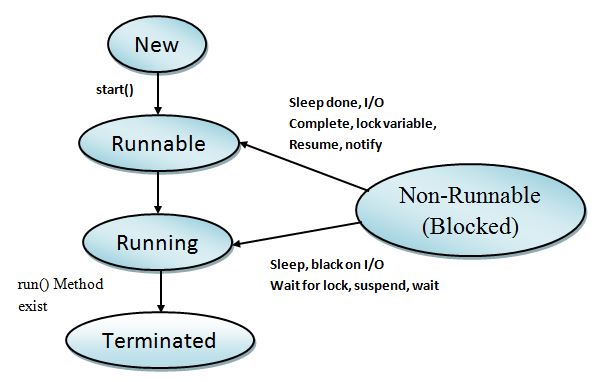
 Life cycle of threads


New
The thread is in new state if you create an instance of thread class but before the invocation of start() method.

Runnable
A thread in the runnable state is executing the Java virtual machine but it may be waiting for other resources from the operating system such as processor.

Running
The thread is in running state if the thread scheduler has selected it.

Blocked (Non Runnable)
It is the state when the thread is still alive, but is currently not eligible to run.

Terminated
A thread is in terminated or dead state when its run() method exists.

Write a Java program to create a form with student id, student name, level, and two button insert and clear. Handle the event such that buttons with perform the operations as implied by their name.


import javax.swing.*;
import java.awt.*;
import java.awt.event.*;
import java.sql.*;
class Student extends JFrame implements ActionListener
{
 JLabel sid,sname,slevel;
 JTextField tid,tname, tlevel;
 JButton insert, clear;
 JPanel p1,p2,p3,p4;
 Student()
 {
  setSize(400,250);
  setTitle("Students Data Entry");
  setDefaultCloseOperation(JFrame.EXIT_ON_CLOSE);
  
  p1=new JPanel();
  p2=new JPanel();
  p3=new JPanel();
  p4=new JPanel();

  setLayout(new BorderLayout());
  add(p1,BorderLayout.CENTER);
  add(p2,BorderLayout.SOUTH);
  p1.setLayout(new GridLayout(1,2));
  p1.add(p3);
  p1.add(p4);

  p3.setLayout(new FlowLayout(FlowLayout.LEFT, 75,20));
  p4.setLayout(new FlowLayout(FlowLayout.LEFT, 25,20));
  sid=new JLabel("Student ID");
  sname=new JLabel("Student Name");
  slevel=new JLabel("Level");
  p3.add(sid);
  p3.add(sname);
  p3.add(slevel);
  tid=new JTextField(10);
  tname=new JTextField(10);
  tlevel=new JTextField(10);
  p4.add(tid);
  p4.add(tname);
  p4.add(tlevel);
  p2.setLayout(new FlowLayout(FlowLayout.CENTER, 20,20));
  insert=new JButton("Insert");
  clear=new JButton("Clear");
  
                p2.add(insert);
  p2.add(clear);
  
  insert.addActionListener(this);
  clear.addActionListener(this);
    
  setVisible(true);
 }
 public void actionPerformed(ActionEvent ae)
 {
  Connection c=null;
  Statement s=null;
  try
  { 
   Class.forName("com.mysql.jdbc.Driver");
c = DriverManager.getConnection("jdbc:mysql://localhost/mydb","root", "raj");
   s=c.createStatement();
   if(ae.getSource()==insert)
   {
           int id;
                                String name, level;
    id=Integer.parseInt(tid.getText());   
                                name=tname.getText();
    level=tlevel.getText();
    
  String query="insert into studentdb values("+id+",'"+name+"',"+level+")";
    s.executeUpdate(query);
  JOptionPane.showMessageDialog(this,"Data is Recorded!!!!");
   
   }
   
   if(ae.getSource()==clear)
   {
                            tid.setText("");  
                            tname.setText(""); 
                            tlevel.setText("");
   }
  }
  catch(Exception e)
  {
                    System.out.println(e);
  }
 }
 public static void main(String a[])
 {
  new Student();
 }
}


Multiprocessing is the use of two or more central processing unit within a single computer system. The term also refers to the ability of a system to support more than one processor or the ability to allocate task between them. Multiprocessor is a computer system having two or more processing units each sharing main memory and peripherals, in order to simultaneously process programs.


Multiprocessing however means using more than one processor. However, multiprocessor or parallel system are increasing in importance nowadays. These systems have multiple processors working the parallel that share the computer clock, memory bus, peripheral devices etc. The following figure demonstrate the multiprocessor architecture as

Types of Multiprocessors

There are mainly two types of multiprocessor i.e symmetric and asymmetric multiprocessors.
1. Symmetric Multiprocessor
In this type of multiprocessor each runs an identical copy of the OS and these copies communicate with one another as needed. All Processor are peers. Examples are Windows NT, Sun Solaries, Digital Unix, OS/2 and Linux.

2. Asymmetric multiprocessor
In this multiprocessor each processor is assigned a specific task. A master processor controls the system; the other processor look to the master for instructions or predefined tasks. It defines a master-slave relationship. Example Sun OS version 4.
Asymmetric multiprocessor was the only one type of multiprocessor available before symmetric multiprocessor were created. Now also, this has cheaper option.


Advantages of multiprocessor systems 

  • More reliable system (Ability to continue working if any CPU fails) 
  • Enhanced Throughput 
  • More Economic systems
  • Increased Expense 
  • Complicated Operating system required 
  • Large main memory required 

Flynn's Classification 


  • In 1966, Flynn's proposed or classified the computer architecture into 4 types. So this concept known as Flynn's classification. 
  • This classification has been used as a tool in the design of modern processors and their functionalities. 
  • Due to Flynn's classification the multiprocessing and multiprocessing concept has evolved. 
  • Flynn's classified the system into four types that is based upon the number of current instruction streams and data streams available in the architecture . 

Flynn's Classifications


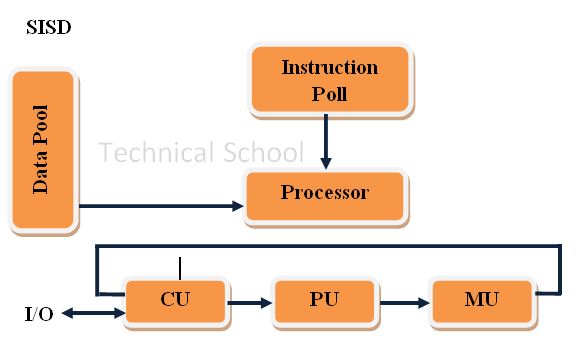
Single Instruction Single Data (SISD) System 


  • It is Uni-processor machine 
  • It executes a single instruction which operate on a single data stream. 
  • In SISD, machine instructions are processed in a sequential manner, So it is known as sequential computers. 
  • It this the speed of the processing element in the SISD model is limited or dependent on the rate at which the information is transformed. 
SISD Uni-Processor Architecture
Captions 
CU - Control Unit                    PU - Processing Unit
MU - Memory Unit                 IS - Instruction Stream  
DS - Data Stream 

Single Instruction Multiple Data (SIMD) Systems 


  • SIMD is multiprocessor system. 
  • It execute the instruction on all the CPU's but operate on different data streams. 
  • SIMD model is well suited to scientific operations. So that the information can be passed to all the processing elements organized data elements of vectors can be divided into multiple sets (N sets for N PE system) and each PE can process on data set. 
  • SIMD system is cray's vector processing machine. 
SIMD Architecture (With Distributed Memory) 
Captions : 
CU - Control Unit                     PU - Processing Unit
MU - Memory Unit                  IS - Instruction Stream
DS - Date Stream                      PE - Processing Element 
LM - Local Memory 

Multiple Instruction Single Data (MISD) Systems 


  • It is a multiprocessor machine 
  • It execute different instructions on different PE (Processing Element) but all of the operates on the same data set. 
                      Example ; sin(x) + cos(x) + tan(x)
  • It performs different operations on the same data set. 
  • The computer system built using the MISD model are not useful in most of the applications. 
MISD Architecture (The systolic Array) 
Captions
CU - Control Unit,          PU- Processing Unit,            MU- Memory Unit, 
IS - Instruction Stream,          DS-Data Stream,             PE - Processing Element
LM - Local Memory 


Multiple Instruction Multiple Data (MIMD) Systems)


  • This system is multiprocessor machine
  • It executes multiple instructions on multiple data sets. 
  • In this, each processing elements (PE) has separate instruction and data streams
  • The computer system built using the MIMD model are capable for all types of applications
  • In this processing elements (PE) work asynchronously while SIMD and MISD machine doesn't work asynchronously 
MIMD Architecture (With shared Memory)
Captions: 
CU - Control Unit                 PU - Processing Unit
MU - Memory Unit               IS - Instruction Stream
DS - Data Stream                  PE - Processing Element
LM - Local Memory

A process scheduler schedules different process to be assigned to the CPU based on particular scheduling algorithms. In this section we will discuss about FCFS (First come First Server) Scheduling algorithm.

First Come First Serve (FCFS)
In this algorithm jobs are executed on first come, first serve basis. It is a non preemptive, preemptive scheduling algorithm. This algorithm is easy to understand and implement. Its implementation is based on FIFO queue. It is poor in performance as average wait time is high.


Example :
Consider following process and calculate average turnover FCFS algorithm.
= Solution
Gaint Chart
Average Waiting Time = Finished time - Arrival time - Brush time
                                     = (0+25+32)/3
                                     = 19
Average Turnaround Time = Finished time - Arrival time
                                           = (27+34+34)/3
                                           = 31.67

Device driver is the software that is responsible for communicating with device controller and reset of the operating system. Device drivers are vendor specific software and are provided by I/O device manufactures. It place vital role in making operating systems independent of I/O devices. Device manufactures are responsible for providing different drivers for different operating systems. This means separate device driver is needed for Windows, Linux, Sun Solaries, Unix etc.

Fragmentation refers to the condition of disk in which files are divided into pieces scattered around the disk. Fragmentation occurs naturally when we use a disk frequently, creating, deleting and modifying files.
There are two types of fragmentation

1. Internal Fragmentation 
  • It occurs with all memory allocation strategies. This is caused by the fact that memory is allocated in blocks of a fixed size, wheres the actual memory needed will rarely be that exact size. For a random distribution of memory requests, on the average 1/2 block will be wasted per memory request, because on the average the last allocated block will be only half null. 
  • Note that the same effect happens with hard drives, and that modern hardware gives us increasingly larger drives and memory at the expense of ever larger block size, which translate to more memory lost to internal fragmentation. 
  • Some system use variable size blocks to minimize losses due to internal fragmentation. 


2. External Fragmentation 
  • External fragmentation means that the available memory is broken up into lots of little pieces, none of which is big enough to satisfy the next memory requirement, although the same total could. 
  • All the memory allocation strategies suffer from external fragmentation, though first and best fits experience the problems more so than worst fit. The amount of memory lost to fragmentation may very with algorithm, usage patterns, and some design decision such as which end of a hole to allocate and which end to save on the free list. 
  • Statistical analysis of first fit, for example, shows that for N blocks of allocated memory, another 0.5 N will be lost to fragmentation. 
  • If the program in memory are relocatable, then the external fragmentation problem can be reduced via compaction, i.e. moving all processes down to one end of physical memory. This only involves updating the relocation register for each process, as all internal work is done using logical addresses. 


virtual memory is a section of a hard disk that's set up to emulate the computer's RAM.
A computer can address more memory than the amount physically installed on the system. This extra memory is actually called virtual memory and it is a section of a hard disk that's set up to emulate the computer's RAM.

Virtual Memory is a storage allocation scheme in which secondary memory can be addressed as thought it were part of main memory. Virtual memory is a memory management technique that is implemented using both hardware and software. It maps memory addresses used by a program, called virtual address, into physical addresses in computer memory. It gives an illusion to the programmer that programs which are larger in size than actual memory can be executed. Virtual memory can be implemented with demand paging.
The main visible advantage of this scheme is that programs can be larger than physical memory. Virtual memory serves two purposes. First, it allows us to extend the use of physical memory by using disk. Second, it allows us to have memory protection, because each virtual address is translated to a physical address.


Modern microprocessors intended for general-purpose unit, or MMU, is built into the hardware. The MMU's job is to translate virtual addresses into physical addresses.

Virtual memory also allows the sharing of files and memory by multiple processes with several benefits:

  • System libraries can be shared by mapping them into the virtual address space of more than one process. 
  • Processes can also share virtual memory by mapping the same block of memory to more than one process. 
  • Process pages can be shared during fork() system call, eliminating the need to copy all of the page of the original (parent) process. 


Concept of semaphore was devised by Dijkastra in 1965. Semaphore is an integer variable that is used to record number of weakups and had been saved. If it is equal to zero it indicates that no wakeup's are saved. A positive value shows that one or more wakeup's are pending. The DOWN operation (sleep) checks the semaphore to see if it is greater than zero. If it is, it decrements the value (UP) and continues. If the semaphore is zero the process sleeps. The UP operation (weakup) increments the value of the semaphore. If one or more proces were sleeping on that semaphore then one of the process is chosen and allowed to compute its DOWN. Checking and updating the semaphore must be done as an atomic action to avoid race conditions. Product Customer problem can be solved using semaphore as below.


#define N 100 /* number of slots in the buffer */
typedef int semaphore; /* semaphores are a special kind of int */
semaphore mutex = 1; /* controls access to critical region */
semaphore empty = N; /* counts empty buffer slots */
semaphore null = 0; /* counts full buffer slots */
void producer(void){
    int item; 
    message m;      // message buffer. 
    while(TRUE){
        item = produce_item(); // generate something to put in buffer 
        receive(consumer, &m); // Receive an empty message, if any 
        build_message(&m, item); // construct a message to send 
        send(consumer, &m);  // send item to consumer 
    }
} 
void consumer(void){
    int item, i; 
    message m; 
    for(i=0; i<N; i++)
        send(producer, &m);  // send N empty messages 
    while(TRUE){
        receive(produce, &m);  // get message containing item   
        item = extract_item(&m); // extract item from message
        send(producer, &m); //send back empty replay 
        consumer_item(term); //do something with the item
    }
}

The shell is an interface between user and the operating system

  • The operating system shell is the mechanism that carries out the system calls requested by the various parts of the system. 
  • Shell is not part of the operating system kernel. The shell is the part of operating systems such as UNIX and MS-DOS where we can type commands to the operating system and receive a response. 
  • Shell is also called the Command Line Interpreter (CLI) or the “C” prompt. Shell is the primary interface between a user sitting at his terminal and the operating system. Many shells exist, including sh, csh, ksh, and bash.
  • It starts out by typing the prompt, which tells the user that the shell is waiting to accept a command. If the user now types “date” command, the shell creates a child process and runs the date program as the child. 

  • While the child process is running, the shell waits for it to terminate. When the child finishes, the shell types the prompt again and tries to read the next input line. 
  • A more complicated command is: 
                cat file1 file2 file3 | sort > /dev/lp &
  •  This command concatenates three files and pipes them to the sort program. It then redirects the sorted file to a line printer. The ampersand “&” at the end of the command instructs UNIX to issue the command as a background job. This results in the command prompt being returned immediately, whilst another process carries out the requested work. 
  • Above command makes a series of system calls to the operating system in order to satisfy the whole request.


Mainframe Operating Systems: 
  • A mainframe with 1000 disks and thousands of gigabytes of data is not unusual. Mainframes are normally used as web servers, servers for large-scale electronic commerce sites etc. 
  • The operating systems for mainframes typically offer three kinds of services: batch, transaction processing, and time sharing. 
  • A batch system is one that processes routine jobs without any interactive user present.  For example, claim processing in an insurance company
  • Transaction processing systems handle large numbers of small requests per second; for example, check processing at a bank or airline reservations. 
  • Timesharing systems allow multiple remote users to run jobs on the computer at once, such as querying a big database. 
  • These functions are closely related: mainframe operating systems often perform all of them. An example mainframe operating system is OS/390, a descendant of OS/360


Personal Computer Operating Systems: 
  • Job of personal computer operating system is to provide a good interface to a single user. They are widely used for word processing, spreadsheets, Internet access etc. 
  • Personal computer operating systems are so widely known to the people who use computers but only few computer users knows about other types of operating systems. 
  • Common examples of PC operating systems are Windows 2008, Windows 2007, the Macintosh operating system, Linux, Ubuntu etc. 
Server Operating Systems: 
  • Server operating systems run on servers, which are very large personal computers, workstations, or even mainframes. 
  • They serve multiple users at once over a network and allow the users to share hardware and software resources. Servers can provide print service, file service, or Web service. 
  • Internet providers run many server machines to support their customers and Web sites use servers to store the Web pages and handle the incoming requests. Some Examples of typical server operating systems are UNIX and Windows 2007 server, Sun Solaris etc.


Real-Time Operating Systems: 
  • Another type of operating system is the real-time system. These systems are characterized by having time as a key parameter. 
  • Deadline slip may cause huge disaster sometimes. Two Types: hard real-time system,  soft real-time 
  • If the action absolutely must occur at a certain moment (or within a certain range), we have a hard real-time system. For example, if a car is moving down an assembly line, certain actions must take place at certain instants of time, if a welding robot welds too early or too late, the car will be ruined
  • Another kind of real-time system is a soft real-time system, in which missing an occasional deadline is acceptable. Digital audio or multimedia systems fall in this category.
Time Sharing Systems:
  • Time sharing is a technique which enables many people, located at various terminals, to use a particular computer system at the same time. 
  • Time-sharing or multitasking is a logical extension of multiprogramming. Processor's time which is shared among multiple users simultaneously is termed as time-sharing. In Time-Sharing Systems objective is to minimize response time.
  • Multiple jobs are executed by the CPU by switching between them, but the switches occur so frequently. Thus, the user can receives an immediate response. 

In this section we take a brief look at the history of operating system which is almost the same as looking at the history of computers.


First Generation (1945-1955)
  • During second second world war many people were developing automatic calculating machines. These first generation computers filled entire rooms with thousands of vacuum tubes. 
  • They did not have an operating system, they did not even have programming languages and programmers had to physically wire the computer to carry out their intended instructions. The programmers also had to book time on the computer as a programmer had to have dedicated use of the machine. 
Second Generation (1955-1965)
  • Vacuum Tubes provide very unreliable and a programmer, wishing to run his program, could quite easily spend all his/her time searching for an replacing tubes that had blown. 
  • Development of Transistor : Now, instead of programmers booking time on the machine, the computers were under submitted on punched cards that were placed onto a magnetic tape. This tape was given to the operators who ran the job through the computer and delivered the output to the expectant programmer. 
  • Concept of batch-processing (jobs): Instead of submitting one job at a time, many jobs were placed onto a single tape and these were processed one after another by the computer. The ability to do this can be seen as the first real operating system. 


Third Generation (1965-1980)
  • IC (Integrated circuit) as a replacement for transistors : The third generation saw the start of multi programming. This is the computer could give the illusion of running more than one task at a time. 
  • When one job had to wait for I/O request, another program could use the CPU. The concept of multi-programming led to a need for a more complex operating system. 
  • Another feature of third generation machine was that they implemented spooling. This allowed reading of punch cards onto disc as soon as they were brought into the computer room. This eliminated the need to store the jobs stored to disc, thus allowing programs that produced output to tun at the speed of the disc, and not the printer. 
  • Up until these point programmers were used to giving their job to an operator and watching it run. 
  • This concept led to the concept of time sharing. This allowed programmers to access the computer from a terminal and work in an interactive manner. 
  • Obviously, with the advent of multi programming, spooling and time sharing, operating system had to become a lot more complex in order to deal with all these issues. 

Fourth Generation (1980-present): 
  • The late seventies saw the development of Large Scale Integration (LSI). This led directly to the development of the personal computer (PC). 
  • These computers were (originally) designed to be single user, highly interactive and provide graphics capability. One of the requirements for the original PC produced by IBM was an operating system and, Bill Gates supplied MS-DOS on which he made his fortune. 
  • In addition, mainly on non-Intel processors, the UNIX operating system was being used.
  •  Mainly, we can say that Graphical User Interface (GUI) became popular in 4th  generation computers.


Fifth Generation (Sometime in the future): 
  • We can notice that each generation have been influenced by new hardware. The fifth generation of computers may be the first that breaks with this tradition and the advances in software will be as important as advances in hardware. 
  • Able to interact with humans in a way that is natural to us. No longer will we use mice and keyboards but we will be able to talk to computers in the same way that we communicate with each other. 
  • In addition, we will be able to talk in any language and the computer will have the ability to convert to any other language. Computers will also be able to reason in a way that imitates humans. Advances need to be made in AI (Artificial Intelligence). 
  • It is also likely that computers will need to be more powerful. Maybe parallel processing will be required. Maybe a computer based on a non-silicon substance may be needed to fulfill that requirement (as silicon has a theoretical limit as to how fast it can go). 

MKRdezign

Contact Form

Name

Email *

Message *

Powered by Blogger.
Javascript DisablePlease Enable Javascript To See All Widget